
Tuesday, March 31, 2009
Search Engine Spider Simulator
This is how a search engine views your website. Use this tool, it is free -> Search Engine Simulator

Find a good niche
First of all it is not easy to find a good niche, all you have to do is sit and watch. There are a lot of websites to help you to find some niches and go with your research further.
Good websites to watch:
- Google Hot trends
- Seomoz Popular searches - this is the best source to find out what is hot on social networks
- Ebay hot list
- Twitter - find out what is the hottest topic
After you find some keywords you want to try go with Adwords Keyword Tool or other free online tools i have on the main page and type it in and see what is the most searched keyword phrase starting with your main keyword.
You want to work with long tail keywords and narrow your niches.
For eg:
Major KW: Photoshop Tutorials
More focused: Free Photoshop Tutorials
Even more focused: Free Animation Photoshop Tutorials
Ultra focused: Free Gif Animation Photoshop Tutorials
Using keyword suggestion tools like: Adwords, Wordtracker or Keyword Discovery you should look for keyword seach volume. They are not 100% exact but you`ll get a pretty good idea of the volume in searches.
For Wordtracker you need to find a keyword with 100-200 searches at minimum.
Then you should check your keyword difficulty. Use these 2 free online tools:
1 ) SEO Chat Keyword Difficulty
2) SEO Logs Keyword Difficulty
Any keyword has a range of 0-100. Work with those keywords with a percentage around 50%.
If you are a newbie in seo do not start a niche website with 70% or up.
For each keyword you have a formula:
Good Keyword ratio = Search volume / difficulty score
'Search volume' you find searching on google a keyword phrase in quotes: "keyword phrase".
A good search volume number would be anything less than 1,000,000 competitors. Don`t go up if you are new.
Tuesday, March 10, 2009
URL structure for Google
If you start a new website i would recommend you to format your URL structure like that:
create-photoshop-tutorials.html
create_photoshop_tutorials.html
createphotoshoptutorials.html
in this order. If you already have a website you should not probably change anything.
This is just for Google but you should run some tests for Yahoo, MSN or Microsoft.
create-photoshop-tutorials.html
create_photoshop_tutorials.html
createphotoshoptutorials.html
in this order. If you already have a website you should not probably change anything.
This is just for Google but you should run some tests for Yahoo, MSN or Microsoft.
Tuesday, March 3, 2009
Search engines guidelines
A webmaster should always follow acceptability guidelines for each search engine. Review these guidelines and become familiar with them.
Google Guidelines:
http://www.google.com/Webmasters/guidelines.html
Yahoo Guidelines:
http://help.yahoo.com/help/us/ysearch/basics/basics-18.html
Ask Guidelines:
http://about.ask.com/en/docs/about/editorial_guidelines.shtml
DMOZ Guidelines:
http://www.dmoz.org/help/submit.html
Coding guidelines published by the World Wide Web Consortium (://www.w3.org/) should be followed as well as tested using their free valuator which checks the markup validity of Web documents in HTML, XHTML, SMIL, MathML, etc. (://validator.w3.org/)
Wednesday, January 28, 2009
Tuesday, January 27, 2009
Favicons listed in google SERPs?
There are rumours nowadays saying that Google is testing favicons in search results.
Here is a screenshot results for Matt Cutts` website:
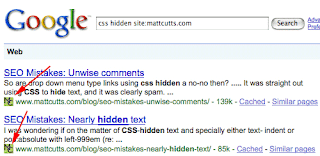
We tested it and nothing showed up so far but according to a Google employee this could be true:
"We do a ton of tests every year, so I wouldn't be surprised to accidentally stumble across something like this :-). That said, I'd be curious to hear of other changes in the search results pages that you guys would like to see. I don't really have anything to do with that, but it's always neat to see what kind of ideas you all would have. Do you think favicons make sense in search results? Do they help you to recognize a site that you like to go to?"
John from Google
Here is a screenshot results for Matt Cutts` website:

We tested it and nothing showed up so far but according to a Google employee this could be true:
"We do a ton of tests every year, so I wouldn't be surprised to accidentally stumble across something like this :-). That said, I'd be curious to hear of other changes in the search results pages that you guys would like to see. I don't really have anything to do with that, but it's always neat to see what kind of ideas you all would have. Do you think favicons make sense in search results? Do they help you to recognize a site that you like to go to?"
John from Google
Thursday, January 22, 2009
What is a Good hyperlink?
A good text link needs to be surrounded by other keywords and to be clearly visible for the reader. From SEO point of view it is important to have a good anchor text pointing to somebody`s website. This is how a website gets a vote from you for a specific keyword phrase.
For eg. "For excellent examples of good photoshop tutorials hypertext look no further than teachtutorials.com, online photoshop tutorials resource"
Also, which URL do you think it is correct?
http://www.mysite.com
http://www.mysite.com/
http://www.mysite.com/index
http://www.mysite.com/index.html
http://mysite.com
http://mysite.com/
http://mysite.com/index
http://mysite.com/index.html
Let`s have a talk about it.
Monday, January 5, 2009
Top 20 social networking websites in 2008
1. Blogger (222 million)
2. Facebook (200 million)
3. MySpace (126 million)
4. Wordpress (114 million)
5. Windows Live Spaces (87 million)
6. Yahoo Geocities (69 million)
7. Flickr (64 million)
8. hi5 (58 million)
9. Orkut (46 million)
10. Six Apart (46 million)
11. Baidu Space (40 million)
12. Friendster (31 million)
13. 56.com (29 million)
14. Webs.com (24 million)
15. Bebo (24 million)
16. Scribd (23 million)
17. Lycos Tripod (23 million)
18. Tagged (22 million)
19. imeem (22 million)
20. Netlog (21 million)
[credits to Comscore]
Facebook beats Myspace
According to Comscore, Facebook pulled in 123.9 million unique visitors and 114.6 billion page views in May beating Myspace.com's 114.6 million unique visitors and 45.4 billion page views.

2. Facebook (200 million)
3. MySpace (126 million)
4. Wordpress (114 million)
5. Windows Live Spaces (87 million)
6. Yahoo Geocities (69 million)
7. Flickr (64 million)
8. hi5 (58 million)
9. Orkut (46 million)
10. Six Apart (46 million)
11. Baidu Space (40 million)
12. Friendster (31 million)
13. 56.com (29 million)
14. Webs.com (24 million)
15. Bebo (24 million)
16. Scribd (23 million)
17. Lycos Tripod (23 million)
18. Tagged (22 million)
19. imeem (22 million)
20. Netlog (21 million)
[credits to Comscore]
Facebook beats Myspace
According to Comscore, Facebook pulled in 123.9 million unique visitors and 114.6 billion page views in May beating Myspace.com's 114.6 million unique visitors and 45.4 billion page views.

Free SEO Suggestion Tools
Hello readers and Happy New year!
Let`s talk a little bit about the power of keyword suggestions tool in your search engine optimization. Here are two powerful SEO tools: Google Suggest and Youtube suggestion.
I`ll give you some tips on how you should choose your keywords for your website, the most searched keywords for your chosen field of expertise.
Say you are offering 'photoshop tutorials' you can get this keyword expansion:
Google Suggest
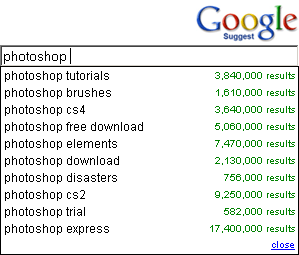
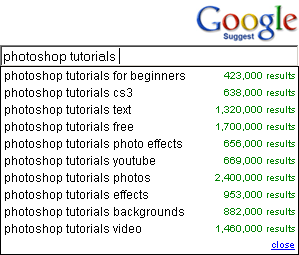
Youtube suggestion:
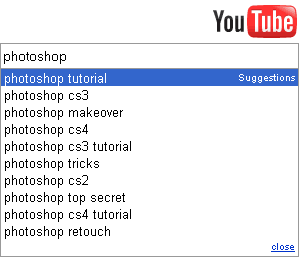
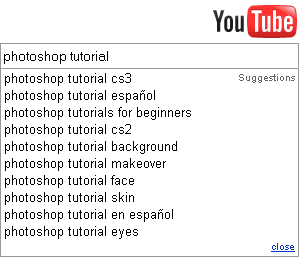
what is next? use it in your webpage in your title, an h1 at the top of the page tag, inside an anchor text and also spread the keywords among your content.
Let`s talk a little bit about the power of keyword suggestions tool in your search engine optimization. Here are two powerful SEO tools: Google Suggest and Youtube suggestion.
I`ll give you some tips on how you should choose your keywords for your website, the most searched keywords for your chosen field of expertise.
Say you are offering 'photoshop tutorials' you can get this keyword expansion:
Google Suggest


Youtube suggestion:


what is next? use it in your webpage in your title, an h1 at the top of the page tag, inside an anchor text and also spread the keywords among your content.
Wednesday, December 31, 2008
Most popular google searches in 2008
At the end of year 2008 looking back we had many captivating and memorable events like: Beijing Olympics, US Presidential Elections and one of the most important Lehman Brothers bankruptcy.
Google most searched keywords in 2008 (Global) according to Google Zeitgeist:
1. sarah palin
2. beijing 2008
3. facebook login
4. tuenti
5. heath ledger
6. obama
7. nasza klasa
8. wer kennt wen
9. euro 2008
10. jonas brothers
Happy New Year everybody! See you in 2009!
Google most searched keywords in 2008 (Global) according to Google Zeitgeist:
1. sarah palin
2. beijing 2008
3. facebook login
4. tuenti
5. heath ledger
6. obama
7. nasza klasa
8. wer kennt wen
9. euro 2008
10. jonas brothers
Happy New Year everybody! See you in 2009!
Wednesday, December 17, 2008
Mobile Internet Search Providers
According to Nielsenmobile.com here is a Top 3 for Q1 2008 by Provider Share:
1. Google (61%)
2. Yahoo! (18%)
3. MSN (5%)

- 65% of Google search users and 63% of Yahoo! searchers are male.
- 44% of Google users rate their satisfaction with mobile Internet search between 8 to 10 on a 10-point scale, compared to 40% of Yahoo! searchers.
(source: Nielsenmobile.com)

1. Google (61%)
2. Yahoo! (18%)
3. MSN (5%)

- 65% of Google search users and 63% of Yahoo! searchers are male.
- 44% of Google users rate their satisfaction with mobile Internet search between 8 to 10 on a 10-point scale, compared to 40% of Yahoo! searchers.
(source: Nielsenmobile.com)


Monday, December 8, 2008
Internet Mobile Market Trends 2009-2012
If you make a research regarding NEW SEO 2009 TRENDS you`ll get many results. I`ve picked some of the most relevant directions:
- SEO for mobile (.mobi)
- Link building (smarter, more relevant)
- Creative Marketing
- Social Networking
- SEo Blogs
- Good informative content
- Niches
- Video
- More In-House SEOs for companies
- Search Engine Marketing
- Anything interactive
Mobile Facts:
PriceWaterhouse says that mobile television subscriptions are expected to grow 5x to $19 bilions by 2012 compared to $408 milions in 2007. The United States is expected to make $2.1 bilions of that 2012 figure.
Telefonica O2 survey indicates that mobile marketing budget percentage is expected to grow 150% by 2013. 8% of marketing directors anticipate behavioural targeting to be an important capability by 2010.
Kelsey Group said recently that 44.7% US mobile users are looking for a mobile phone with better Internet capability. US mobile search advertising revenues are expected to grow from $33.2 mln in 2007 to $1.4 bln in 2012, representing a compound annual growth rate of 112%. 9.8% of respondents used their mobile phones to conduct Internet searches for products and services in their local area. During the same period, 10.7% downloaded or looked at maps, while 10.9% indicated they had downloaded search or mapping applications (for use on the Internet) to supplement those that came with their mobile phones 78% of Americans own cell phones.
According to Pew Internet Project 78% of Americans own cell phones, up from 65% in 2004 and 73% in 2006. Personal digital assistants (PDAs), such as Blackberries, are also becoming more common among working Americans. Overall, 13% of Americans and 19% of those who are working own a PDA or Blackberry (up from 14% of workers in 2006). Most PDA owners (69%) say their PDAs double as cell phones. This trend is also rapidly increasing; in 2006 only 26% used their PDAs as cell phones, According to Informa, the number of mobile social-networking users will rise from 2.3% of global cell-phone users at the end of 2007 to as many as 23% of all mobile users by the end of 2012.
Mobile Search Engine across different countries
in June 2008
(source: Comscore)

Mobile Subscribers Activity
(source: Comscore)

Operating System Market Share
(source: MarketShare)

How to get traffic to my blog
If you created yourself a blog and you want to get more people to read it we prepared for you some tips:
1. Write Every Day - You must write frequently and often for more than one reason. First, the search engines will pick up your blog quicker and more often if you post every day or two. Second, your readers will return more often if they know there is going to be new content every day.
2. Create a Theme - Don’t write about any thing that pops into your head. Try to create a theme - in this case, likely your band and its development - and stick with it every day. An occasional aside never hurt anyone, but consistently changing topics only diffuses your message.
3. Be Informative - Offer useful, new information. Your readers want a good reason to return and the classic “you heard it hear first” mentality almost always works. Announce new tracks, new tours, and new ideas here and people will start following your posts for new information.
4. Proof Read and Spell Check - Always ensure every post looks nice and crisp before launching. If it appears you don’t care about quality, it only negatively reflects on your band and your profile.
5. Seed Your Blog Posts - Use social bookmarking websites like Del.icio.us, Digg, Stumbleupon, Netscape, Facebook, Reddit, and Furl to seed your blog posts so that more people can find them. If you are especially proud of a post, make sure to seed it everywhere.
6. Comment on Other Blogs - By commenting on other popular blogs in your niche - bands and music related topics - you can draw other blog owners and readers back to your own blog to check out what you write about. You might even get a link back which will increase your visibility.
7. Provide Something Extra - Give your readers a little bonus for stopping by. Create videos, podcasts, etc. Freebies and incentives are always a good way to maintain heavy blog traffic.
8. Submit to directories - Once you have many entries on your blog make sure you submit to blog directories for link exchange.
Wednesday, December 3, 2008
Free Seo Tools
Keyword research tool
Keyword density
| 13. | Competition Tool - SEO Digger  |
| 14. | Competition Analysis Tool - Seoscorecard |
| 15. | Top Competitor Tool - Webuildpages |
Search engine keyword position tool
| 16. | Search Engine Keyword Position - SEO Chat |
| 17. | Keyword Analysis Tool - Mcdar |
| 18. | SERPS Position Checker - LinkVendor |
| 19. | Website Position Tool - Rnk1 |
Link Popularity
Class C Checker
| 27. | Class C Checker - Webrank Info |
| 28. | Class C Checker - Webmaster Toolkit |
| 29. | Class C Checker - SEO Chat |
Spider Simulator
Friday, November 28, 2008
Page number plugin for Wordpress
We found a great tool which is an alternative for Next page and Previous Page in your website. It is very easy to navigate, stylish and has a tighter internal link structure which makes it easier for search engines to find your posts.
You can choose between these themes:


Download WP Post Numbers
You can choose between these themes:


Download WP Post Numbers

Wednesday, November 26, 2008
google: good seo means text
Google and Yahoo! are working with Adobe to get better at indexing the textual content within Flash movie files, for proper search optimization.
In the meantime, according to Adam Lasnik, who is a Search Evangelist at Google, webmasters should continue focus on their text content to make their sites visible to Google and accessible to all users because your text is still king.
Watch his video below:
In the meantime, according to Adam Lasnik, who is a Search Evangelist at Google, webmasters should continue focus on their text content to make their sites visible to Google and accessible to all users because your text is still king.
Watch his video below:
Tuesday, November 25, 2008
Advanced SEO Tips and Tricks
1. Syndicating Articles that Link to Your Sitemap
As you probably know, syndicating articles is one of the best methods for obtaining one-way backlinks.
They are also valuable pieces of search engine bait because search engine crawlers are frequent visitors to many high-profile article directories. If you want to get the spiders quickly crawling your site, simply submit an informative article to a site like EzineArticles, GoArticles, or ArticleCity.
However, there's another article marketing strategy that isn't mentioned much in marketing circles. This tactic can get the crawlers searching deeper into your site and indexing more of your pages. Simply link to your sitemap within the resource box. This will send the spiders straight to a content buffet where they can quickly slurp up all of your pages.
2. Translating Your Website Into Other Languages
Are you marketing in just one language? If so, you are missing out on 64.8% of your marketing potential. This is because 64.8% of the world is surfing the internet in a language other than English. By becoming a multilingual marketer, you immediately open up a stream of new markets. Google alone crawls web pages in 35 different languages.
One of the best ways to attract worldwide traffíc is to translate your site and register it with both English and foreign-language search engines and directories. If you are a seasoned SEO, you'll be happy to hear that the competition in foreign search engines is much less than in those of the United States.
In addition, online foreign language markets are currently growing at a much faster rate than English speaking markets.
You have the opportuníty to tap into this market while it's in an exponential growth phase.
3. ROR Sitemaps
As you probably know, sitemaps are important for making sure your site can be completely spidered and indexed by the search engines. Unfortunately, many of these sitemaps are specific to one search engine or another. For this reason, there have been a number of Google and Yahoo site map generators produced in recent years.
However, there is an alternative that is even more exciting. These are ROR sitemaps and they are readable by all search engines, not just by Google or Yahoo.
ROR is an exciting new sitemap tool that uses XML feeds to describe your website. These sitemaps are structured feeds that enable search engines to complement text search with structured information to better interpret the meaning of your site. With a ROR sitemap, search engines can better understand your products, services, images, newsletters, articles, podcasts, and anything else that you want to describe.
For example, if you are selling products, a ROR file enables you to document your product names, descriptions, prices, images, availability, affilíate programs, and any other
relevant information. Search engine crawlers like the Googlebot have an enormous job to do. It's time we start helping them to better understand our content.
4. Keyword Phrases that Convert
Selecting the right keyword phrases is the single most important aspect of any SEO campaign. Unfortunately, many webmasters target the wrong keywords. Too many of us target very general keywords like "real estate" or "internet marketing". Although these terms get lots of visitors, it is unlikely that you will be able to rank highly for them. Then, even if you do, this type of traffíc produces very low conversion rates because it does not target prospects.
You will be much more successful, if you target keyword phrases that are 3-4 words long. These terms are much less competitive and have been proven to convert much better than keywords that are 1 to 2 words long.
Who do you think is more likely to buy; someone who goes to Google and searches for "ipod" or someone who searches for "4gb black ipod nano"? Obviously, the person who searches for a more specific phrase is much closer to making a buying decision.
5. GoogSpy
Would you like to get an in-depth view of how your competitors run their business? Well, you can do exactly that with an online service known as GoogSpy. GoogSpy is a free research tool that will tell you what keywords your competitors are bidding on.
This tool tracks over 500,000 keywords every day from Google and then loads this goldmine of information into the GoogSpy.com database. Using this tool, you can browse by company or by search term.
This tool is extremely powerful. Unfortunately, many people take it for granted. This service basically hands you a business strategy on a silver platter. Maybe we should just keep this one to ourselves and enjoy the benefits of being one step ahead of our competition.
For example, let's say you wanted to do some in-depth research on Overstock.com, one of the largest companies online. You would simply go to googspy.com and type in overstock.com. You will then be shown thousands of words that this company bids on. These keywords are proven profít generators. Research like this would normally cost thousands of dollars, but they are providing it free of charge.
If you want to find keywords with high conversion rates, simply type in words such as buy and purchase. You will be shown keyword phrases that are bid on that include the words buy or purchase. These are very lucrative keyword phrases because the person who types in "buy sony playstation 2" knows exactly what they want. They're not just looking around, they are in buying mode. These are the type of keywords you want to bid on. Using GoogSpy, you can uncover these hidden gems in seconds.
Other high-converting keyword phrases include brand names and product names. Type in the keyword "camera" and you will find thousands of different brands and product names for cameras. These keywords are some of the best keywords because of their high conversion rate.
6. Internal Links Within Content
The navigation of your site is a crucial element of your search engine optimization campaign. Each link within your navigational structure should correlate with a keyphrase that you are trying to rank for.
However, you can also include internal links within your content. For example, let's say you have written an article about online marketing. Within the article are a number of keyword phrases. Some of these phrases include "link popularity" and "web site traffíc". If you have other articles within your site that pertain to these topics, then you should definitely link those keyword phrases to those articles. By doing this, you can increase the link popularity of other pages within the same site.
There are very few sites that take advantage of this optimization technique. By doing this, you enable the search engines to find and index much more of your site. These internal links also contribute to a higher ranking because of the anchor text that is used.
Many people only think of inbound links from outside websites when trying to raise their link popularity. However, the internal link structure is also a major ranking factor.
7. Using Your Log Files for SEO
Your server logs reveal very important information about your site. If you learn to use them properly, they can quickly help to maximize your site's traffíc and conversion rates.
One of the most valuable pieces of information found in your log files are search phrases. The log files will tell you exactly which keywords people are using to find your website.
Once you have optimized a page, the log files will tell you how people are finding that page and what keywords they are searching for to get there. If you find that people are using keywords that you hadn't thought of to get to a certain page, it would probably be in your best interest to further optimize that page for those keywords.
You might also want to create a new page optimized for that particular term. This is especially true if a new page would enable you to serve better information on the phrase being searched for.
In addition, by looking at how your site is found organically, you can determine whether the same keyword phrases belong in your paid search campaigns. Only choose the ones that are highly relevant. You will find that these keyword phrases have the best conversion rate.
Top Ten Most Powerful Internet Brands in 2008
Google is the number one brand in the world. Many companies attempt to dethrone it, but as you can see, the search giant is a threat for traditional businesses as well—on different levels, of course.

Source: Millward Brown Optimor (including data from brandz, Datamonitor, and Bloomberg)

Source: Millward Brown Optimor (including data from brandz, Datamonitor, and Bloomberg)
Monday, November 24, 2008
The Internet Advertising Market on June 2008
 comScore Media Metrix has released its monthly analysis of U.S. consumer activity at top online properties for June 2008.
The following are the Top 50 Sources for Marketing and Advertising your business online according to comScore Media Metrix:

1. Platform-A**
2. Yahoo! Network**
3. Google Ad Network**
4. Specific Media**
5. ValueClick Networks**
6. Yahoo!
7. Tribal Fusion**
8. Google
9. Casale Media Network**
10. adconion media group**
11. DRIVEpm**
12. interCLICK**
13. Traffic Marketplace**
14. AOL Media Network
15. 24/7 Real Media**
16. MSN-Windows Live
17. Tremor Media - Media Partners
18. ADSDAQ by ContextWeb**
19. CPX Interactive**
20. Turn, Inc**
21. Burst Media**
22. AdBrite**
23. Centro
24. MYSPACE.COM*
25. Collective Media**
26. Vibrant Media**
27. Ybrant - Oridian - ADdynamix Network**
28. NNN Total Newspapers: U.S.
29. Gorilla Nation Media
30. Undertone Networks**
31. YOUTUBE.COM
32. Yume Video Network – Media Partners
33. MSN.COM Home Page
34. EBAY.COM
35. TattoMedia**
36. IAC Ad Solutions – Media Partners
37. Ask Network
38. Kontera**
39. MapQuest
40. PrecisionClick**
41. AMAZON.COM
42. NNN Top 25
43. Business.com Network
44. Real Cities Network
45. IB Local Network
46. FACEBOOK.COM
47. Quadrant One
48. EBAY.COM Home Page
49. The Nabbr Network - Exclusive Media Partners
50. Clearspring Widget Promotion Channel - Media Partners
source: Comscore Press Release
10 Rules for Driving Traffic Using Forums
1. Build Your Profile
When you register for a forum, you should fill in as much information as possible. Most forums have a page for your user details. People visit this page when they want to know more about you or send you a private message. Describe what you do and what your web site is about.
Avatars are an important part of your profile. Because of the volume of text on a forum page, avatars are the way people identify the poster. Make sure your avatar is unique and recognizable at a glance—you want to make sure people associate you with your ideas. And if you use an avatar on multiple forums and social networks, use the same one.
Most importantly, write a strong signature. This is the text that will appear at the bottom of every post you write, so put some thought into it. Like the signature of an email, your forum signature says who you are. Use your signature to link to your website.
2. Follow the Rules
Read the rules of the forum carefully, and follow them. Take the time to read through the discussions to get an idea of how people converse. There are implicit social norms that you must be mindful of.
If you follow my ten rules, you probably won’t violate any forum rules, but don’t take any chances.
3. Start by Responding
Forums are about conversations and communities. One person starts a thread, either with a question or a comment, then others respond, either with answers or their own comments.
People give advice free of charge in forums, but at the cost of their time and energy. They rightfully expect that the favor will be returned, so they shun people who take without anything to give.
It may not be your intention to be a leach on the community, but participants are wary of newcomers automatically. Take the time to respond to others before asking anything yourself. Post in other user’s threads before you start your own.
Most forums show the number of posts of the author next to every comment. Make 50 posts before you start your own thread. You might have an important question for the community, but it’s best to establish some social capital first. Otherwise, your question may be ignored.
4. Contribute Your Expertise
Don’t hold back. If you have an expert opinion, demonstrate it. Don’t give a half-baked response telling the member they can learn more if they follow the link to your page. Contribute highly relevant information immediately and in abundance. You don’t have to qualify your expertise unless it’s asked for. That’s what your profile is for.
5. Don’t Be a “Me Too” Poster
If someone has already said it, don’t bother repeating it. All you’re doing is wasting your energy and other people’s time. That’s not to say you shouldn’t state your agreement with someone else, but make sure you provide additional support to their argument.
In the event another poster disagrees with a thread you support, use the opportunity to contribute a new angle to the argument, using your own expertise.
6. Don’t Self-promote
Even if it’s allowed within the rules of the forum, don’t post about your own web site and products, unless it’s in direct response to a request for information. If you want to promote yourself, your signature is the place to do it.
On the flip side, tell people about great products you aren’t affiliated with. Sharing information is why forums exist.
7. Explain Yourself, but Be Brief
Don’t assume people have the same level of knowledge on a subject as you, but don’t imagine that they have the time or inclination to be either. Make your point straight away, then back it up with support. People who are interested in your initial thought will read more; those who aren’t will skip your comment and move on to the next thread.
Make sure you’re writing for the Web. Keep sentences and paragraphs short, with plenty of white space. Less is more.
8. If You’re Wrong, Say So
Forum discussions often hinge upon opinion, so nothing is more attention-grabbing than a poster on an internet forum admitting that they were wrong!
If you’re in the heat of a discussion, and someone persuades you to change your mind, say so. It’s a pretty big deal, and furthermore, you should thank that person.
Remember that forums aren’t soapboxes— they’re platforms for conversations and an opportunity to network.
9. Write Intelligently and Correctly
You don’t have to carefully revise and sculpt every forum post, but you should proof everything once. Consider using the spell-check if you’re not an impeccable speller.
Although most forums don’t set specific rules on grammar and punctuation, you should give thought to this: everything you say, every single post, every nugget of wisdom, is a representation of your personal brand. Writing like an intelligent adult is the equivalent of maintaining proper hygiene and a presentable appearance in the workplace; if you don’t pay any attention to it, it can undermine everything else you do.
However, be aware that the Internet is a global phenomenon, and some of the people you interact with will be non-native English speakers. You don’t need to point out any mistakes your fellow posters make.
10. Negativity is a No-no
It goes without saying, just because you have a degree of anonymity, communicating from the safety of your work desk, doesn’t mean you can harass other posters. This is especially the case when you’re trying to build an online reputation and attract users to your site. Forums posts may fall off the main page, but they never go away.
If someone disagrees with you, respond with a thoughtful rebuttal, or thank them for their opinion—for example, “It’s always interesting to hear a different take.” If someone attacks you, either thank them as if they’d simply disagreed, or ignore them entirely.
All forums have trolls—people who aggressively harass you just for their own entertainment. The worst thing you can do is engage with them.
Subscribe to:
Posts (Atom)